Real processes
One Web Worker per PID with stdout, stderr, stdin and kill(). Child processes are workers too, supervised by a kernel.

A WebContainer-style sandbox
No backend. Real processes in Web Workers, Node's own runtime, npm install, and dev servers you can preview in an iframe.
npm install wcvm
Runs your stack, installed from the real registry
 React
React Vue
Vue SvelteSvelteKit
 Next.js
 React Router
 Astro
Astro Angular
 Ember
Ember Solid
Solid Qwik
Qwik Preact
 Lit
Lit Tailwind
 Express
 NestJS
 Vite
ViteNo server to host, scale or pay for. Your users bring the compute.
One Web Worker per PID with stdout, stderr, stdin and kill(). Child processes are workers too, supervised by a kernel.
Node v24's lib/ runs unmodified on a native layer for the browser: fs, streams, http, net, ESM and require(esm).
A built-in npm installs from the real registry into an in-memory filesystem, then npm run starts your scripts.
A Service Worker relays an iframe to a server in the sandbox, WebSockets included, so hot reload just works.
Optionally mirror the filesystem to the Origin Private File System and pick up exactly where you left off.
Ship a static page with two headers. Nothing to deploy, secure or scale on the server side.
Scroll through it. Every step below really runs in the page.
Call boot(). wcvm starts a kernel worker, a file system worker and a fetcher, and waits until they are ready.
The built-in npm resolves versions and downloads tarballs straight into the in-memory filesystem, on a worker that never blocks the page.
Each command is a real process in its own Web Worker. A shell, npm run and Node itself all run side by side.
A Service Worker relays an iframe to the dev server, WebSockets included, so edits hot-reload in place.
The parts that make a real project run, not a toy.
The preview tunnels WebSockets between the iframe and your server, so Vite's HMR updates the page without a refresh.
Reload the tab and your files are still there.
require(esm)Import graphs with cycles and top-level await, like Node 24.
spawn, exec, fork with IPC and worker_threads: each one is another worker, and they all die with their parent.
Real net, http and dgram between sandbox processes.
Node's own streams, with gzip and deflate over the native compression streams.
Studio is built on wcvm: Monaco editor, terminals, live preview, and templates for the frameworks you already use.
export default function App() {
  const [n, setN] = useState(0);
  return (
    <button onClick={() => setN(n + 1)}>
      Clicked {n} times
    </button>
  );
}One dependency, a few lines, and your page can run Node.
import { boot } from "wcvm";

const wc = boot();
await wc.ready;

await wc.fs.writeFile("/hello.js", `console.log("hello from", process.version)`);

const proc = await wc.spawn("node", ["hello.js"]);
console.log(await new Response(proc.stdout).text());  // hello from v24.18.0
await wc.fs.mount({
"package.json": { file: { contents: '{"name":"app"}' } },
src: {
directory: {
"main.js": { file: { contents: "console.log(1)" } },
},
},
}, "/app");
const text = new TextDecoder().decode(await wc.fs.readFile("/app/src/main.js"));
await wc.fs.sync(); // everything is on disk (OPFS) if boot({ persist: true })await wc.preview.enable();
wc.preview.onListen(({ port, listening }) => {
if (listening) iframe.src = wc.preview.url(port);
});
await wc.spawn("npm", ["install"], { cwd: "/app" });
await wc.spawn("npm", ["run", "dev"], { cwd: "/app" });Give users an editor that really installs packages and runs their code.
Let readers run and edit the examples right in the page, like the playground in these docs.
Zero setup for learners: open a link and a working Node project is there.
Show a framework or library running end to end without hosting anything.
A blocked call is Atomics.wait on a SharedArrayBuffer: the worker parks, another worker answers and wakes it. That one trick lets Node's synchronous APIs run in a browser.
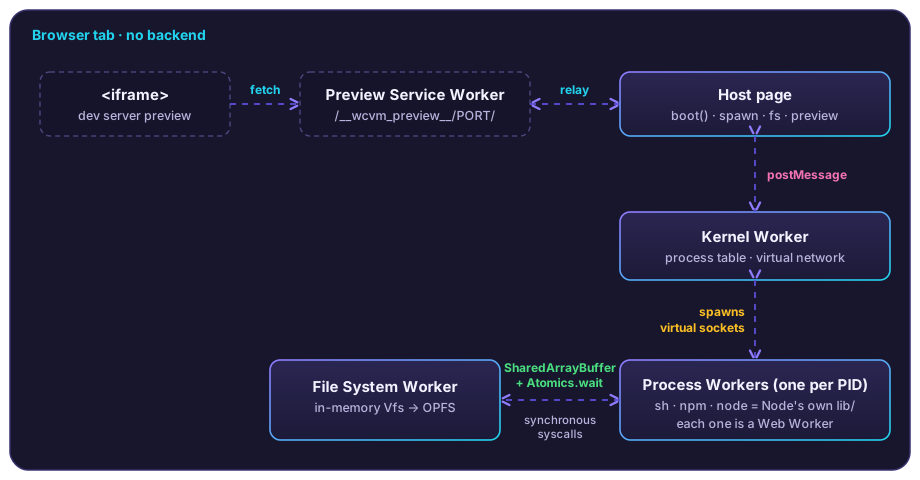
It runs Node v24's own JavaScript lib/, unmodified, on a native layer written for the browser, so fs, streams, http, child_process and ESM behave like Node. It is not full Node: native add-ons (.node files) cannot load, and a few modules such as crypto are partial.
No. It is a static page that sends two headers (cross-origin isolation, needed for SharedArrayBuffer). npm install does need to reach the npm registry from the visitor's browser.
It needs cross-origin isolation and SharedArrayBuffer. It is developed and tested in Chromium; other modern browsers with those features should work but are not covered by the test suite yet.
Vite (React, Vue, Svelte, Preact, Lit, Solid, Qwik), Tailwind v4, Next.js, SvelteKit, React Router 7, Astro, Angular, Ember, Express and NestJS. Each is installed from the real registry and served in real Chromium by the project's end-to-end tests. Nuxt and Vite 8 do not run yet.
The npm package is about 700 kB compressed. The largest piece is the process worker (about 2.4 MB unpacked) that carries Node's runtime.
Yes. wcvm is open source under the ISC license, and its bundled Node.js sources are MIT licensed.
Studio is a VS Code-style IDE built on wcvm: Monaco editor, terminals, live preview and project templates, all running in your tab.